Edit images with Qwen and FLUX.2 Klein
Start with an image and describe what to change. Use one reference with FLUX.2 Klein, or up to three with Qwen Image Edit 2511. Reference editing in Edit is included free.
See how reference image editing works Radiant Canvas
Radiant Canvas for Apple silicon
Create images from a prompt, edit photos with Qwen and FLUX.2 Klein, and upscale them with SeedVR2. Everything runs on your Mac. No account, no uploads, and no credits.
Free download. The PRO trial is for eligible customers on the monthly plan.
Requires Apple silicon and macOS 26.2 or later. Model downloads are separate. Check memory and storage requirements.
Edit with a promptQwen and FLUX.2 Klein reference image editing
Node-based StudioBuild and reuse advanced image workflows
Models that fit your MacSeven image model families plus the SeedVR2 upscaler
Fully on your deviceNo cloud processing or image uploads
Start with an image and describe what to change. Use one reference with FLUX.2 Klein, or up to three with Qwen Image Edit 2511. Reference editing in Edit is included free.
See how reference image editing worksConnect models, prompts, images, and tools in a visual workflow. Inspect the run plan and save the setup for later. PRO adds advanced editing, masks, studies, batches, and export nodes.
Explore Studio workflowsMing-Image-0.1-Design creates images with text or transparent backgrounds, up to 2048 × 2048. Choose 4-bit or 8-bit precision and generate in Create or Studio. Both options are included free.
Read the Ming guide for MacGeneration, reference image editing, and Studio workflows run on your device. Prompts, images, and results stay there. After downloading your models, work offline with no cloud processing.
Read how your work stays privateLocal AI image editing
Have a picture that is almost right? Add it in Edit and describe the change: a different setting, softer light, or a new illustration style. Qwen Image Edit 2511 and FLUX.2 Klein use your reference images and prompt to create a new result, without uploading either to a cloud service.
Reference image editing in Edit is included free.

Up to three reference images
Bring several references into one edit. Tell Qwen how to use each image, such as a subject from image 1 and a setting from image 2. It can also generate an image from text alone.
4-bit: 19.9 GB, 16 GB memory minimum, 32 GB recommended. 8-bit: 31.8 GB, 64 GB minimum, 96 GB recommended.
Read the Qwen Image Edit guideOne reference image
The smallest model download in the app now supports image editing too. Start with one reference, describe what should change, and try another direction without rebuilding your prompt from scratch.
4-bit: 4.7 GB, 16 GB memory minimum. 8-bit: 8.6 GB, 24 GB minimum, 32 GB recommended.
“Place this mug on a wooden table beside a window. Keep its blue glaze and shape.”
“Turn this house into a watercolor illustration. Keep the front door and the two upstairs windows.”
“Place the chair from image 1 in the room from image 2, beside the bookshelf.”
These are prompts to try, not guaranteed results. AI edits can change details you meant to keep. Be specific and check the result. For a process you can repeat, connect your references to an Image Edit node in Studio with PRO.
Node-based Studio for advanced users
Connect models, prompts, images, seeds, and tools on a visual board. Compare models, plan a batch, or build a sequence of edits. Inspect the run plan, then save your workflow to use again. Basic text-to-image workflows are free; running advanced nodes requires PRO. Try them with the 3-day free trial.
For reference editing, connect Image 1 to an Image Edit node with FLUX.2 Klein, or add Image 2 and Image 3 with Qwen. PRO also includes image-to-image generation, masked inpainting, model and seed studies, batches, image grids, and export tools. Depth guidance is available for Krea 2 and Z-Image. Start from a sample, your Create settings, or an image in Gallery. Ming supports Text to Image nodes for designs and transparent images.


Ming-Image-0.1-Design
Use Ming in Create or a Studio Text to Image node. Ask for a poster, a short heading, or an object on a transparent background. Ming works with every image shape and size in Create, up to 2048 × 2048. Portrait and landscape shapes require PRO.
Ming is for text-to-image generation. Reference editing, LoRAs, and negative prompts are not supported for this model. Check spelling and transparent edges before using a result.
| Precision | Fast | Standard |
|---|---|---|
| 4-bit | 15.2 s | 27.2 s |
| 8-bit | 15.1 s | 27.1 s |
Standard mode uses default settings, 12 steps. Fast mode took about 15 seconds for both precisions and requires PRO. Times vary with your Mac, prompt, and settings.
Read the Ming Image guide for setup, requirements, and prompt examples
New in 1.25: SeedVR2 3B
Open the new Upscale mode, add an image, and pick an output size. SeedVR2 enlarges it and restores fine detail. There is no prompt to write, and the image keeps its shape. Upscaling in Upscale is included free.
Choose 1536, 2048, 2560, 3072, or 4096 pixels on the long edge. The short edge follows your image. Macs with 16 GB of memory can upscale up to 3072 pixels.
Softness blurs the image a little before upscaling. Keep it low for clean images. Raise it for small, noisy, or compressed ones.
Choose Upscale image in the Gallery or the image viewer. With PRO, the SeedVR2 Upscale node adds upscaling to Studio workflows.
SeedVR2 3B is a separate 7.3 GB download in Model Manager and needs at least 16 GB of unified memory. Upscaling adds detail the model predicts, so check faces and text before you use a result. Not seeing Upscale yet? Update Radiant Canvas in the Mac App Store.
The comparison workflow
Select the models you want to test and start once. Radiant Canvas generates the same prompt with each model and places the results side by side, so you can choose the strongest result without switching apps or repeating your setup.
Model comparison is included in the free app.

Model Manager
Choose from seven model families: Ming-Image-0.1-Design, Qwen Image Edit, FLUX.2 Klein, Krea 2, Z-Image, ERNIE-Image, and Microsoft Lens. Six families offer standard and higher-precision downloads; Lens has one option. Keep the models you use installed and switch as your project changes.
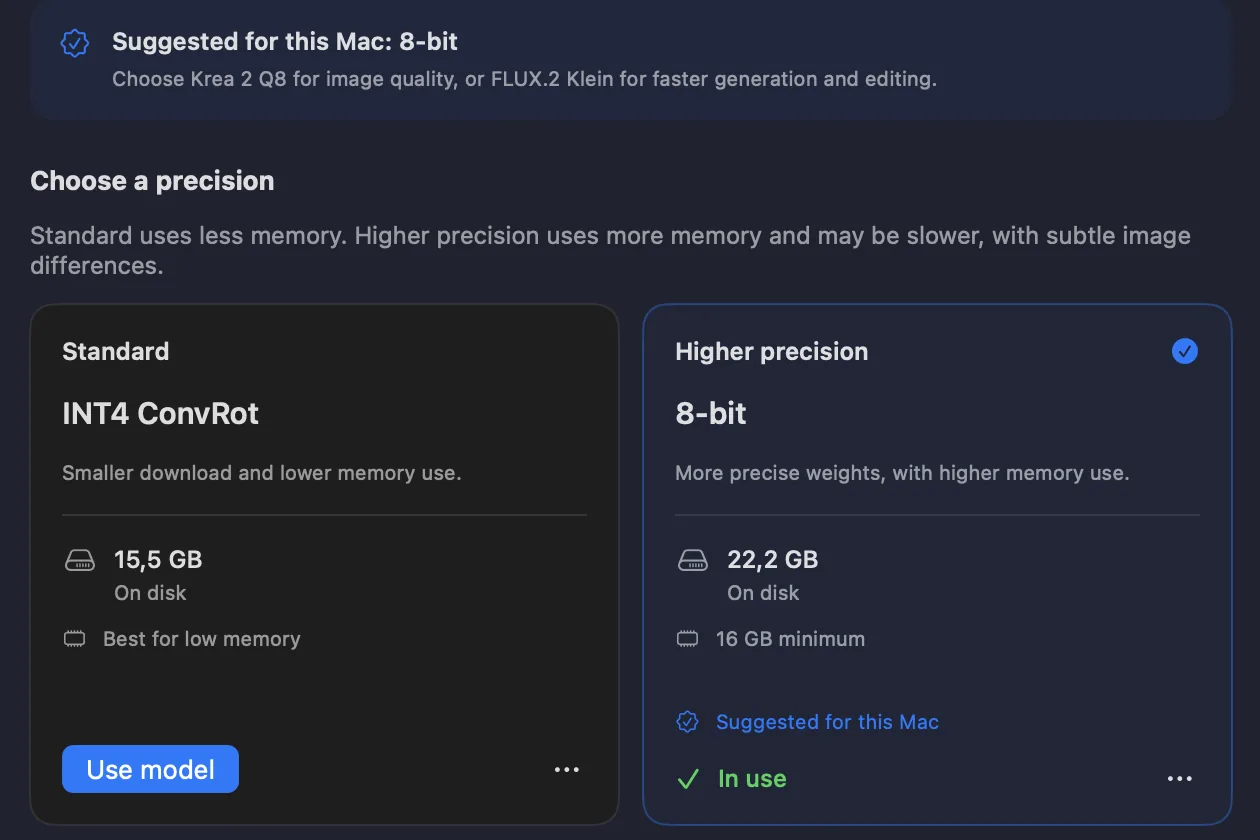
Alongside Krea 2 Q8, you can now download Z-Image BF16, FLUX.2 Klein 8-bit, ERNIE-Image 8-bit, Qwen Image Edit 8-bit, and Ming 8-bit. Model Manager groups them by family so you can choose a standard or higher-precision version. You can keep both installed.
Higher precision uses more storage and memory and may take longer. It does not guarantee a better image. Compare all thirteen downloads and memory requirements.
MLX 8-bit
High-quality four-step generation.
Q8
Higher-precision Krea weights, with a larger download and higher memory use.
4-bit
Fast text-to-image generation and editing with one reference. The smallest download in the app.
8-bit
Realistic images, accurate prompts, and clear text.
INT4 ConvRot
A fast, memory-friendly balance with good image quality.
4-bit
Detailed layouts and text in many languages.
4-bit · Generation and editing
Generate from text or edit with up to three reference images. PRO adds negative prompts and Fast mode for larger images.
4-bit
Designs, text, and transparent backgrounds. Requires at least 16 GB of memory.
8-bit
Designs, text, and transparent backgrounds. Requires at least 16 GB of memory.
Tests used a 1024 × 1024 image on a MacBook Pro with M5 Max and 48 GB unified memory. These are text-to-image timings for the exact variants shown, not editing speeds. Qwen and the higher-precision Z-Image, FLUX.2 Klein, and ERNIE variants have not been measured in this comparison. Ming Standard timings use default settings (12 steps); Fast-mode timings are shown separately. Times vary by Mac, settings, image size, and LoRAs. Fast mode requires PRO.
Apple silicon performance
3.1 secondsFLUX.2 Klein 4B in Fast mode at 1024 × 1024 on the tested M5 Max MacBook Pro with 48 GB.
Made in Radiant Canvas
A city under Antarctic ice. A train above the clouds. A palace on a moonlit sea. These images were generated locally in Radiant Canvas; each caption names the model used.


Free core and optional PRO
Every model is included in the free app, along with square generation, reference image editing in Edit, and upscaling. Compare models, make up to 100 variations, queue up to 100 outputs, and keep your work in Gallery. PRO adds more formats, controls, custom adapters, and advanced Studio nodes.
Try PRO free for 3 days. The trial is available to eligible customers on the monthly plan. Choose it in the app to try all PRO features.
| Feature | Free | PRO |
|---|---|---|
| All thirteen model options and model comparison | Included | Included |
| Square sizes, queue, history, metadata, watermarks, Gallery | Included | Included |
| Reference image editing with Qwen and FLUX.2 Klein | Included | Included |
| Upscaling with SeedVR2 in Upscale | Included | Included |
| Basic Studio text-to-image workflows | Included | Included |
| 4:3, 9:16, and 16:9 formats for supported models | Not included | Included |
| Manual controls and negative prompts for Z-Image and Qwen | Not included | Included |
| Fast mode, ML Enhance, and PNG export | Not included | Included |
| Up to 10 custom LoRA or LoKr adapters for supported models | Not included | Included |
| Advanced Studio nodes for editing, upscaling, studies, batches, and export | Not included | Included |
PRO is available monthly, yearly, or as a one-time lifetime purchase. The monthly plan includes a 3-day free trial for eligible customers, then renews at the monthly price unless canceled. Current prices and trial eligibility are shown in the app before you subscribe.
System requirements
Radiant Canvas requires an Apple silicon Mac running macOS 26.2 or later. Different models need different amounts of unified memory and storage. Model Manager shows compatibility guidance and checks free storage before each download.
| Model option | Download | Unified memory | Best suited for |
|---|---|---|---|
| Ming-Image-0.1-Design 4-bit | 13.4 GB | 16 GB minimum; faster with more memory | Designs, text, and transparent backgrounds |
| Ming-Image-0.1-Design 8-bit | 25.1 GB | 16 GB minimum; faster with more memory | Higher-precision Ming generation |
| Krea 2 Turbo INT4 ConvRot | 15.5 GB | Best option for lower-memory Macs | Balanced Krea quality and memory use |
| Krea 2 Turbo Q8 | 22.2 GB | 16 GB minimum | Higher-precision Krea generation |
| Z-Image Turbo 8-bit | 13.3 GB | 16 GB recommended | Realism, prompt accuracy, clear text |
| FLUX.2 Klein 4B 4-bit | 4.7 GB | 16 GB minimum | Fast generation and one-reference editing |
| ERNIE-Image Turbo 4-bit | 6.7 GB | 16 GB recommended | Detailed layouts and multilingual text |
| Microsoft Lens Turbo MLX 8-bit | 16.8 GB | 16 GB minimum; faster with 32 GB | Fast four-step generation |
| Qwen Image Edit 2511 4-bit | 19.9 GB | 16 GB minimum; 32 GB recommended | Text-to-image and editing with up to three references |
| Z-Image Turbo BF16 | 20.5 GB | 32 GB minimum; 48 GB recommended | Higher-precision Z-Image generation |
| FLUX.2 Klein 4B 8-bit | 8.6 GB | 24 GB minimum; 32 GB recommended | Higher-precision generation and one-reference editing |
| ERNIE-Image Turbo 8-bit | 12.4 GB | 32 GB minimum; 48 GB recommended | Higher-precision ERNIE generation |
| Qwen Image Edit 2511 8-bit | 31.8 GB | 64 GB minimum; 96 GB recommended | Higher-precision generation and editing with up to three references |
| SeedVR2 3B (upscaler) | 7.3 GB | 16 GB minimum; 24 GB for 4096 px output | Upscaling an existing image |
Intel Macs are not supported. Radiant Canvas is arm64-only and uses Apple silicon.
M1 through M5 Macs are supported. Available memory and model choice matter more than the chip name. Some newer chips use faster paths, while earlier chips use compatible fallbacks.
8 GB Macs have limited choices. Model Manager recommends the memory-saving Krea 2 INT4 option. Standard Z-Image and ERNIE may run but recommend 16 GB. Krea Q8, Lens, and standard FLUX.2 and Qwen require at least 16 GB. Ming 4-bit and 8-bit and the SeedVR2 upscaler also require at least 16 GB. Other higher-precision options require 24 to 64 GB, depending on the model.
Model files stay in Radiant Canvas app storage. They cannot currently be moved to an external drive. You can delete each model separately and download it again later.
Keep at least the stated download size free. Radiant Canvas checks the additional space needed, keeps at least a 2 GB allowance for a resumed download, and verifies files before installation.
For more detail, read the Apple silicon and unified memory guide.
Model downloads
Start with one option. Add or remove models later in Model Manager.
Model licenses
Yes. In Edit, select FLUX.2 Klein or Qwen Image Edit 2511, add a reference image, and describe what you want to change. Klein accepts one reference image; Qwen accepts up to three. Editing runs locally and is included free within the free image-size options. Review each result, since AI editing can also change details you wanted to keep.
Both generate images from text and edit existing images locally. FLUX.2 Klein 4B uses one reference image and has a smaller download of about 4.7 GB. Qwen Image Edit 2511 uses up to three references and has a 4-bit download of about 19.9 GB. These standard variants require at least 16 GB of unified memory; Qwen recommends 32 GB. Higher-precision 8-bit variants are also available: Klein needs at least 24 GB and Qwen needs 64 GB. PRO adds Qwen negative prompts and Fast mode for larger images.
Yes. Both models and reference image editing in Edit are included in the free app, within free square image sizes. Running the Image Edit node in Studio requires PRO. There are no per-image charges or cloud credits.
Yes. Open Upscale, add an image, and choose an output size from 1536 to 4096 pixels on the long edge. SeedVR2 3B enlarges the image and restores fine detail without a prompt. It is a 7.3 GB download and needs at least 16 GB of unified memory; Macs with 16 GB can upscale up to 3072 pixels. Upscaling in Upscale is free. The SeedVR2 Upscale node in Studio requires PRO.
No. Prompts, reference images, image generation and editing, results, Gallery data, settings, and imported LoRAs stay on your Mac. Model downloads come from Hugging Face or a mirror. Apple handles App Store purchases and the optional ML Enhance model. The app has no analytics, telemetry, tracking, account, or developer backend. This website uses optional consent-based analytics separately.
Yes, if the Mac runs macOS 26.2 or later and has enough unified memory for the selected model. Intel Macs are not supported. Performance varies by chip, memory, model, image size, and settings.
Ming 4-bit and 8-bit, Krea 2 Q8, FLUX.2 Klein 4B, Microsoft Lens Turbo, and Qwen Image Edit in their standard variants require at least 16 GB. Qwen recommends 32 GB. Z-Image and ERNIE-Image recommend 16 GB. Krea 2 INT4 is the app’s recommended lower-memory option. Higher-precision FLUX.2 needs at least 24 GB, Z-Image BF16 and ERNIE 8-bit need 32 GB, and Qwen 8-bit needs 64 GB. Model Manager shows guidance before download.
Approximate downloads range from 4.7 GB for FLUX.2 Klein 4-bit to 31.8 GB for Qwen Image Edit 8-bit. The requirements table above lists every option. The app checks the remaining space needed before it starts or resumes a download.
Not currently. Model files are stored in Radiant Canvas app storage. You can delete models separately in Model Manager and download them again later without deleting Gallery images.
Yes. Generation and reference image editing work offline after your chosen models are installed. New model downloads, App Store purchases and restoration, and the first download of Apple’s optional ML Enhance model require a connection.
No. Its seven model families are Ming-Image-0.1-Design, Krea 2, Z-Image, FLUX.2 Klein, ERNIE-Image, Microsoft Lens, and Qwen Image Edit. Six families have standard and higher-precision variants, making thirteen downloadable options in total.
Model licenses differ. Radiant Canvas shows the relevant license before each download. Review that license and any adapter license for your intended use. The app does not make one blanket commercial-use guarantee for every model and LoRA.
Q8 is the larger, higher-precision option and requires at least 16 GB of unified memory. INT4 ConvRot is smaller and is the app’s recommended Krea option for lower-memory Macs.
Yes. PRO can add up to ten compatible LoRA or LoKr adapters and save presets for supported model families. Ming does not currently support adapters.
Studio is a visual workspace for repeatable local image workflows. Connect typed nodes, preview images, inspect the run plan, and save workflows for later. Basic text-to-image workflows are free. PRO adds advanced nodes for image input and editing, masks, studies, batches, ControlNet guidance, enhancement, metadata, and export.
No. The free app includes all thirteen model options, square generation, reference image editing in Edit, SeedVR2 upscaling, one-prompt model comparison, up to 100 variations, a queue of up to 100 outputs, prompt history, metadata, watermarks, and the local Gallery. It also includes basic Studio text-to-image workflows.
Getting started
Learn how offline generation works, upscale with SeedVR2, compare models, and check what is included free.
Independent Mac software
Radiant Canvas is developed by Arnold Sallay at Radiant Bear Games. Its image model runtimes are built for Apple silicon and generation jobs are not sent to a remote API.

Free on the Mac App Store
Edit with Qwen or FLUX.2 Klein, build in node-based Studio, create designs with Ming, and upscale with SeedVR2. All on your Mac, with no cloud processing. Start free, or try PRO free for 3 days with an eligible monthly subscription.