
Ren'Py art: a picture for every scene in your script
Open your .rpy file, stage each scene in 3D, and render them all in one go. Your script stays as it is.
Coming to the Mac App Store in November or December 2026. Free, with an optional Pro upgrade.
Email me when it is out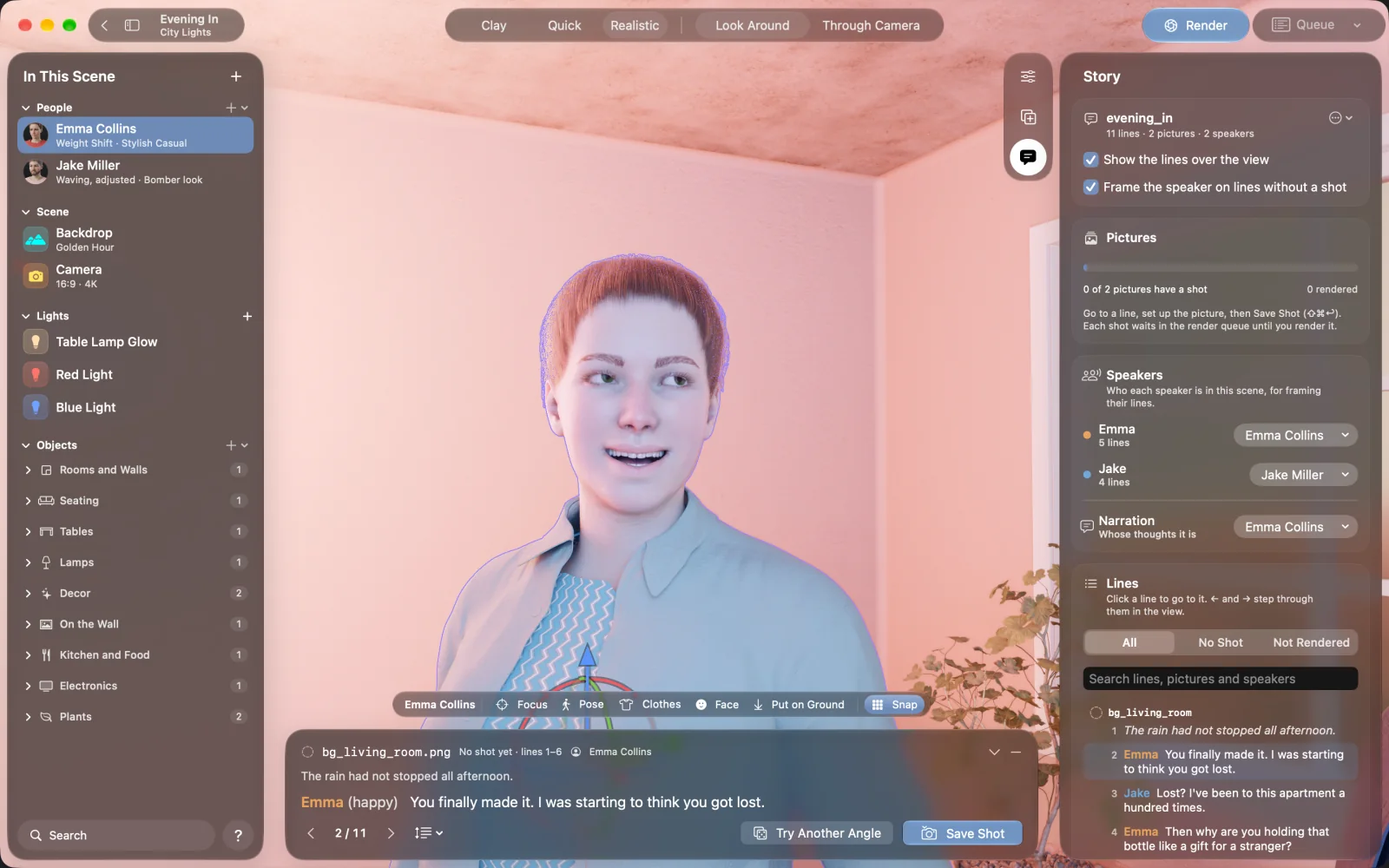
NovelStage reads a Ren'Py script and shows its lines over a 3D scene. You link each speaker to a character, step through the lines with the arrow keys, and save a shot for each scene statement. The app then renders every picture as a PNG named after that statement, ready to copy into your game.
Start from the script you have
NovelStage reads dialogue, narration, scene statements and character definitions. It skips python, screen and transform blocks, and if it cannot read a line it notes that line and moves on. It works from a copy, so your .rpy file is never changed.
define a = Character("Emma")
define d = Character("Jake")

label start:

    scene bg living_room

    "The rain had not stopped all afternoon."

    a happy "You finally made it."

    d "Lost? I've been here a hundred times."
From lines to pictures
Open the script
Open a scene, open the Story panel and choose your .rpy file. Its lines appear over the view.
Link the speakers
Pick which person in the scene plays each speaker, and whose thoughts the narration is.
Step through the lines
Use the left and right arrow keys. NovelStage frames whoever is speaking, opens their mouth and sets the expression the script asks for.
Save a shot
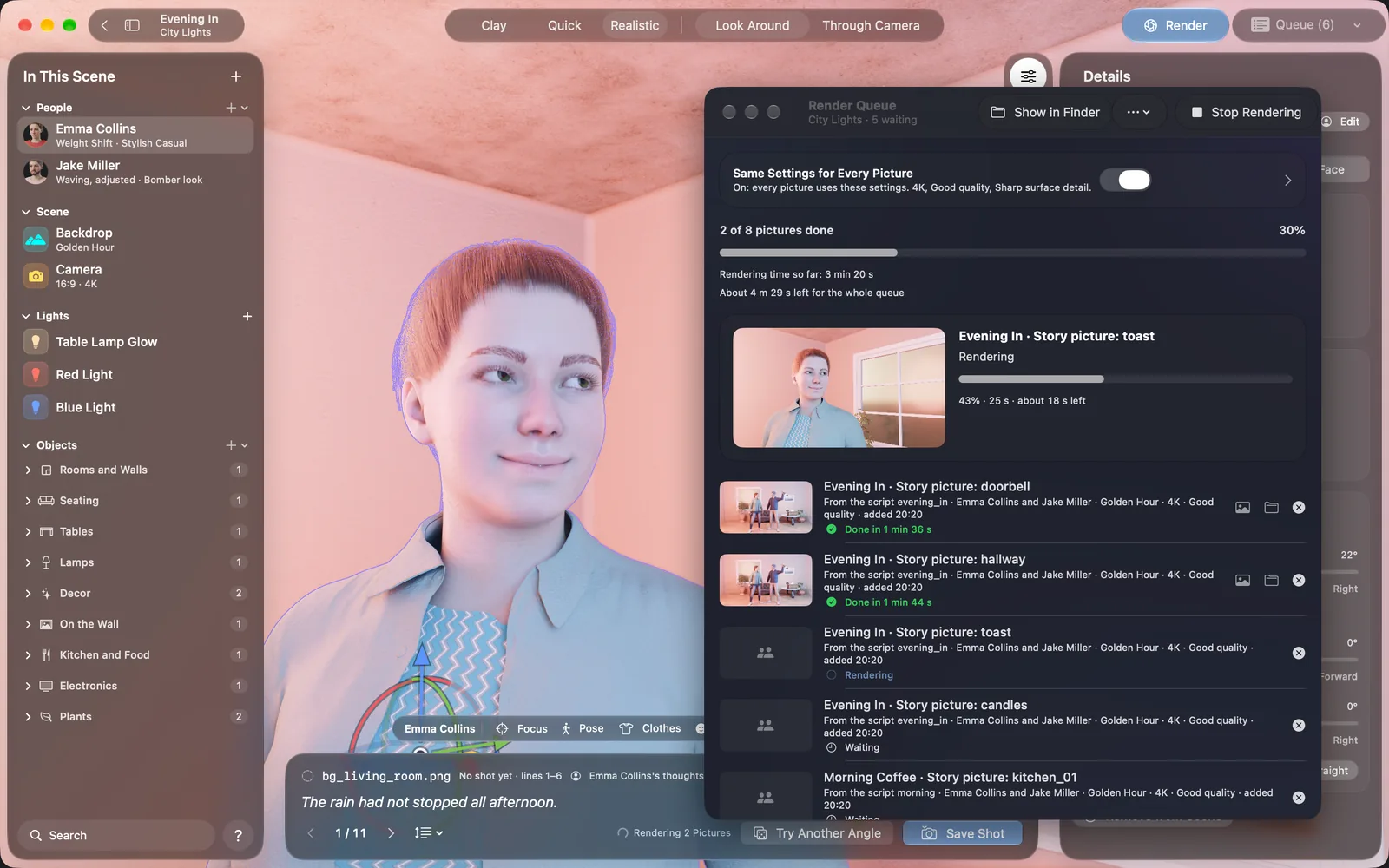
Adjust the camera or a pose if you want to. Press Save Shot, or Try Another Angle first. The picture joins the queue and the next line comes up.
Render them all
Click the Waiting Pictures button in the story bar, and the queue renders one after another.
How the files are named
Each scene statement gets one picture. Lines under it share that picture, so to change the picture partway through a conversation, add another scene statement to your script.
| In your script | File NovelStage saves |
|---|---|
scene bg living_room | bg_living_room.png |
| The same statement again later | bg_living_room_2.png |
Lines before any scene | start_001.png, named after the label |
Files go into a folder named after the script, inside the scene's Renders folder. Show Pictures in Finder in the Story panel opens it.
Loading the pictures in Ren'Py
Copy the PNG files into game/images. There is one thing to know here. Ren'Py names an image after its file, with the extension removed, and a space in the file name is what separates the tag from its attributes. So bg_living_room.png becomes the single image bg_living_room, which is not the same as bg living_room. Your scene line will not find it until you do one of these:
image bg living_room = "bg_living_room.png"That line goes near the top of your script, once for each picture. The other way is to change the statement to scene bg_living_room. Either works. While you develop, Ren'Py shows a placeholder with the name of any image it cannot find, so a quick run through tells you what is missing.
When the script changes
A saved shot keeps the scene as it was. If you rewrite a chapter or rework a set, go back to the line, change what you need, update the shot and render again. Everything else stays where it is.
Ren'Py is a free visual novel engine made by others. NovelStage is not affiliated with or endorsed by the Ren'Py project, and you do not need Ren'Py to use the app.
Questions
Does NovelStage change my .rpy file?
No. It reads a copy of the script and never writes to your file.
Do the pictures work as sprites?
No. NovelStage renders full scenes, with the characters already in the picture. They work as full-screen images shown with the scene statement.
What size should I render for Ren'Py?
Use the size your game runs at. Ren'Py does not resize images unless you tell it to, so a 1920 × 1080 project wants 1080p pictures. Pictures are always 16:9, at 1080p, 4K or 8K.
Does it work with other engines?
The pictures are ordinary PNG files, so any engine can show them. The script reading is for Ren'Py .rpy files only.